

AnkhTech WinPE
Standing on Top Along other Alternatives , Easier to Use , and with a Huge amount of Programs !
AnkhTech WinPE is your Best Solution
For Doing all Types of Maintenance to your PC or Laptop
And as an IT Technician , It Just Makes your Job way much easier!
AnkhTech WinPE Is a Mini Microsoft Windows OS on Your USB Flash Drive
That can Always Help you at Emergencies
One ISO Contains 2 Systems
Windows 11 & Windows 10
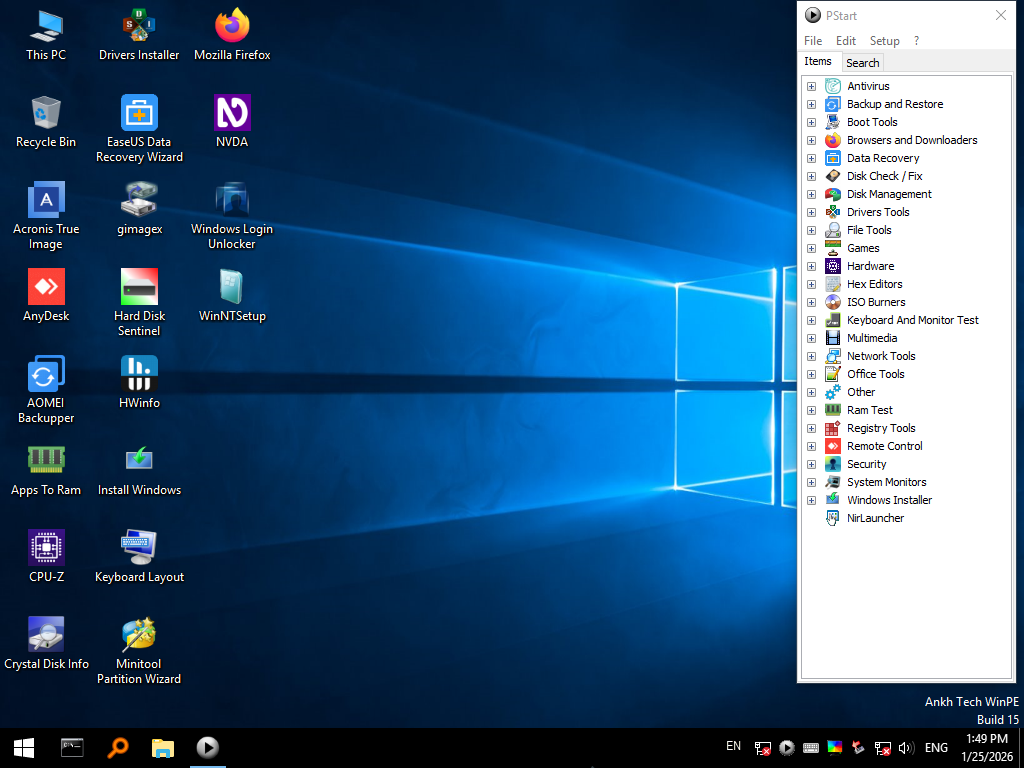
Each System Looks Almost Exactly As Microsoft Windows 10 & 11
Consider it as a Mini Backup Microsoft Windows for Emergencies
Main Features
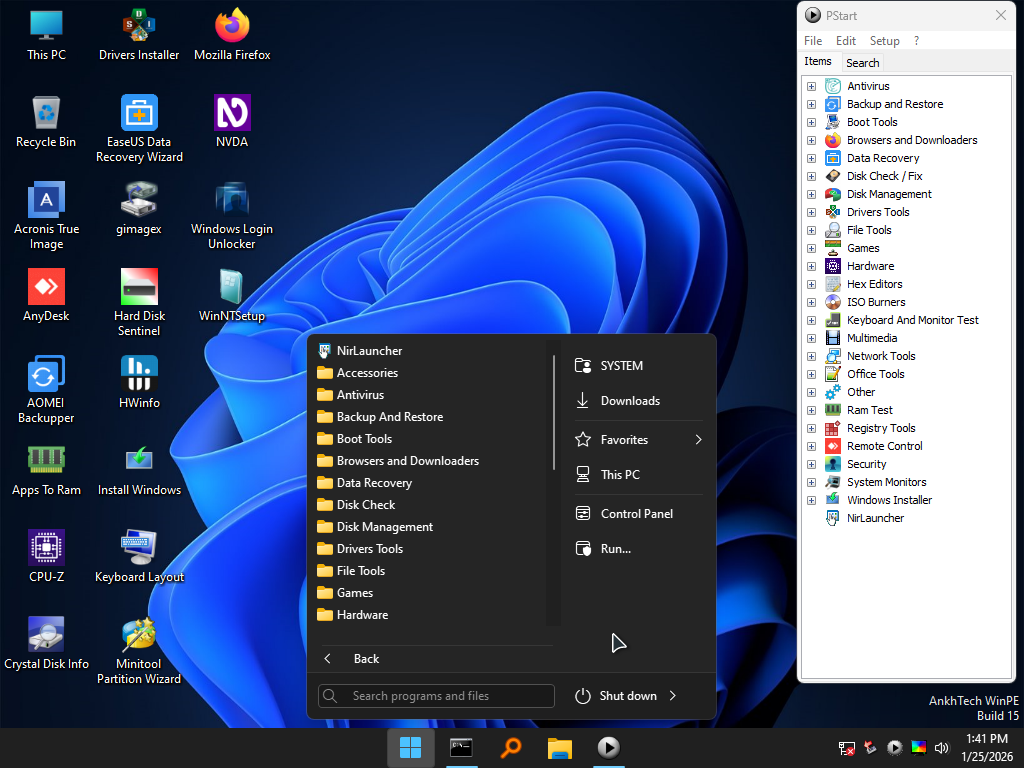
- Very Similar to a Normal Microsoft Windows 11
- if you use Internet Ethernet cable , after you boot you will find the internet already working
- Click on the Network Icon in System Tray to get Available Wi-Fi Connections
- Change Keyboard layout from the Keyboard layout icon on desktop , to write in different languages
- All programs are in the Start Menu and PStart , Some Programs are in Start Menu Only
- AppsToRam Feature, so you can unplug your Flash Drive if you want
- NVDA Screen Reader Starts automatically if it's installed on your PC, and Shortcut on Desktop
- Some Programs are In Context Menu
- Shortcut Keys :
- Most Extensions has Programs to Open Them
- You can Install Your Programs or Run Portable Programs Because it Contains the Most System Files
- You can Integrate Drivers to it
- Supports NVDA and Narrator (Screen Readers)
- Requirements:
WinRAR , UltraISO , FastCopy , Windirstat , Everything , Unlocker
Ctrl + Alt + F : will set max Resolution , Ctrl + Alt + A will set Low Resolution
Ctrl + Alt + Z : to start NVDA Screen Reader , Windows Key + Ctrl + Enter to Start Narrator
Alt + Shift + S : Snipping Tool to take screenshots
PotPlayer is set to Run Video Files
Winamp is set to Run Sound Files
SoftMaker FreeOffice is set to Run Word/Excel Files
WinRAR Opens Compressed Files
UltraISO Opens ISO Files
PicoTorrent Open Torrent Files
3GB ram at least
x64 (64bit) PC or Laptop
Main Features
- Very Similar to a Normal Microsoft Windows 11
- if you use Internet Ethernet cable , after you boot you will find the internet already working
- Click on the Network Icon in System Tray to get Available Wi-Fi Connections
- Change Keyboard layout from the Keyboard layout icon on desktop , to write in different languages
- All programs are in the Start Menu and PStart , Some Programs are in Start Menu Only
- AppsToRam Feature, so you can unplug your Flash Drive if you want
- NVDA Screen Reader Starts automatically if it's installed on your PC, and Shortcut on Desktop
- Some Programs are In Context Menu
- Shortcut Keys :
- Most Extensions has Programs to Open Them
- You can Install Your Programs or Run Portable Programs Because it Contains the Most System Files
- You can Integrate Drivers to it
- Supports NVDA and Narrator (Screen Readers)
- Requirements:
WinRAR , UltraISO , FastCopy , Windirstat , Everything , Unlocker
Ctrl + Alt + F : will set max Resolution , Ctrl + Alt + A will set Low Resolution
Ctrl + Alt + Z : to start NVDA Screen Reader , Windows Key + Ctrl + Enter to Start Narrator
Alt + Shift + S : Snipping Tool to take screenshots
PotPlayer is set to Run Video Files
Winamp is set to Run Sound Files
SoftMaker FreeOffice is set to Run Word/Excel Files
WinRAR Opens Compressed Files
UltraISO Opens ISO Files
PicoTorrent Open Torrent Files
2GB ram at least
x64 (64bit) PC or Laptop
Included Programs
Trellix Stinger
Trend Micro House Call
HijackThis
Acronis True Image 2014
Acronis True Image 2019
Acronis True Image 2021
Active@ Disk Image
AOMEI Backupper
CoolBackup
Drive Snapshot
EaseUS Todo Backup
Fab's AutoBackup 7
Hasleo Backup Suite
Macrium Reflect x10
Macrium Reflect x8
OneKey Ghost
Paragon Hard Disk Manager
R-Drive Image
Symantec Ghost 11.5
Symantec Ghost 12
Symantec Ghost Explorer
Terabyte Image Mount
Terabyte Image View
Terabyte image
BcdTool
Boot Builder
BOOTICE
BootSectGUI
CoolBootRepair
CoolUEFIFix
EasyBCD
EasyUEFI
NT6Repairx86E
NTBOOTAutoFix
Qemu Boot Tester
Qemu Simple Boot
PicoTorrent
IDMan
Firefox
Active@ Partition Recovery
DiskGator Data Recovery
EaseUS Data Recovery
GetDataBack Pro
Hasleo Data Recovery
Hetman Data Recovery
iCare Data Recovery
Lazesoft Recovery Suite
MiniTool Power Data Recovery
Ontrack EasyRecovery
RAID Reconstructor
Recuva
R-Studio
WiseDataRecovery
ATTO Disk Benchmark
Check Disk GUI
Crystal Disk Info
Crystal Disk Mark
Defraggler
DRevitalize V4.10
GSmartControl
H2testW
Hard Disk Sentinel
HD Tune Pro
HD Speed
HDD Low Level Format Tool
HDD Regenerator 2011
HDD Regenerator 2024
HDDExpert
HDDScan
O&O Defrag
SSDLife
SSD-Z Utility
TxBENCH
Victoria
WD Data Lifeguard
Active@ KillDisk
AOMEI Partition Assistant
DiskGenius
DiskPart GUI Micro 2.0
EaseUS Partition Manager
Macrorit Partition Expert
MiniTool Partition Wizard
NTFS to FAT32 Wizard
Paragon Hard Disk Manager
Driver Booster
Smart Driver Backup
Double Driver GUI
Everything
Explorer++
FastCopy
Omziff
Q-Dir
SwiftSearch
TeraCopy
TotalCommander
Windirstat
WinMerge
WinRAR Archiver
Wintools.net Premium
WizTree
XYplorer
FreeCell
Hearts
LBreakout2
Minesweeper
Solitaire
SpiderSolitaire
Tetris
3D Pinball
Battery Expert
Battery Monitor
BurnInTest 8.1
BurnInTest 9.2
Core Temp
CPU-Z
GPU-Z
Hardware Info
Hardware Monitor
LinX
PassMark SoundCheck
PerformanceTest
Prime95
Speccy
System Information Viewer
CI Hex Viewer
HxD
WinHex
ImgBurn
Rufus
WinToUSB
PowerISO
Ventoy2Disk
UltraISO
Eizo Monitor Test
IsMyLcdOK
IsMyTouchScreenOK
Keyboard Test Utility
PassMark Keyboard Test
PassMark Monitor Test
FastStone Capture
oCam
PotPlayer
Prism Video File Converter
VideoPad Video Editor
WebCam
Winamp
WinSnap
Advanced Port Scanner
DNS Jumper
FileZilla FTP Client
HoverIP
Lantern VPN
MyLanViewer
PUTTY
Softperfect Network Scanner
TcpView
WinBox
WinSCP
WNet Watcher
Psiphon
PlanMaker
SoftMaker Presentations
STDU Viewer
SumatraPDF
TextMaker
xchm
Attribute Changer
BIOS Backup ToolKit
Captain Nemo Pro
CMOS De-Animator
Disk to VHD Converter
Dism++
GimageX
Hash Calculator
KeePass
Primo Ramdisk
Puran Utilies
Resource Hacker
SLIC ToolKit
VeraCrypt
Windows Recovery
MemTestPro
MemTestProTool MFC
Quick Memory Test OK
RamExpert
RamMon
RamTester Application
IsMyMemoryOK
RegFromApp x32
RegFromApp x64
Registry Workshop
Regshot
Ammyy Admin
AnyDesk
Radmin Server (Default ID: 1234 , Password: 123456 )
Radmin Viewer
Radmin VPN
Remote Desktop Connection
RustDesk Remote Desktop
Supremo
TightVNC
NTFS Drive Protection
ntpwedit64
O&O UserManager
OemKey
PEPassPass
Product Key Recovery
Recover Keys
Reset Windows Password
ShowKeyPlus
Unlocker
Windows Login Unlocker
System Informer
WhatChanged
Process Monitor
Autoruns
CoolInstall
NT6x Fast installer
Windows Installer
WinNT Setup
WinToHDD
Programs List
The List is Huge compared to the ISO Size Which makes it Unique and better than All other Alternatives Contains Most if not all the Important and Known Programs AnkhTech WinPE is Your Best choice all the Time
- All Programs work without Problems (All Tested)
- All Programs are in PStart in each System
- Some System Related Programs in the Start Menu
- Some Programs Require Internet Connection like the Antivirus Section
- More than 1 alternative in each category
- Some of These Programs are integrated in the Context Menu (ex. WinRAR , UltraISO etc etc)
- Some of These Programs Open Their File Extensions (ex. WinRAR opens Compressed Files etc etc)
- it Even Contains Games , just in-case you planning to do time Consuming Tasks So you don't get bored
See it in Action
A quick walkthrough of the interface and features.
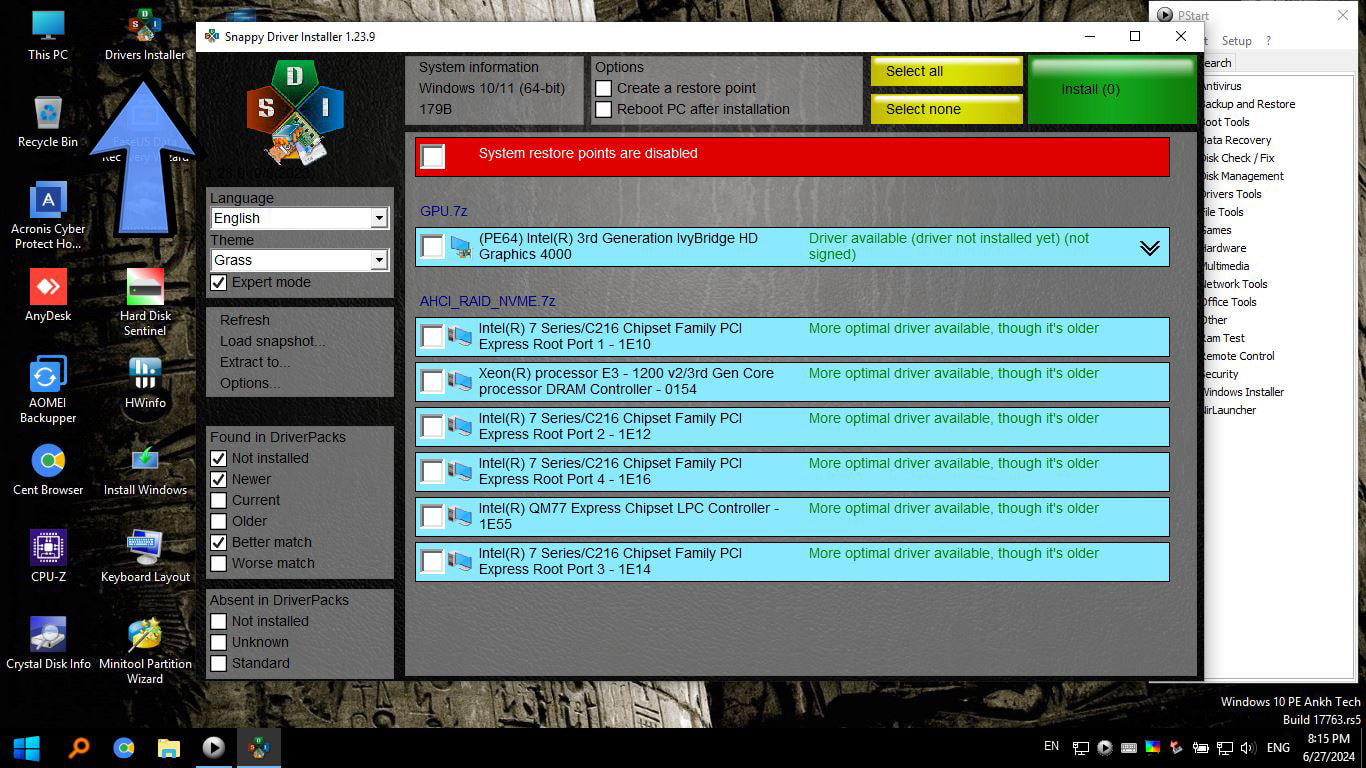
Driver Installer
AnkhTech WinPE allows you to install additional drivers on the fly to support specific hardware needs.
Simply run the Driver Installer tool found on the desktop to scan for missing hardware support.
If you Find Our Modified ISO Helpful, You can Support the Project by Donating
Don't Forget that you can Request Your Own Custom Modified OS
Also Don't Forget that you can Request Your Own Custom Website Design
Download Links:
Recommended: Gofile.io - 1fichier - KrakenFiles
Contain Ads: Megaup - vikingfile - mixdrop.ag
These Links have Ads, Please Use an Ad blocker like "uBlock Origin"
Release Date : 7/20/2025
Version: 15
ISO size: 3.78GB
SHA1: 4fa191e7d5b6c7a9a53870263649876d4b60329b
-
◆
10/3/2025:
- Most of the Programs Updated
- Drivers Updated
- Programs added :-
Diskpart GUI 2 "Disk Management"
h2testw.exe "Disk Fix"
XYplorer "FileTools"
Windows Recovery "Other"
Version History
- ◆ Kyhi/ChrisR : Win10XPE is used to Create the Mini and Full Boots
- ◆ Wimbuilder2 is used to create the Tiny Boot
- ◆ Sergei Strelec : i took some Programs , Registries , Drivers , ideas from his WinPE
- ◆ CryptoNick : 7z SFX Constructor has been used to compress each program into 1 EXE file
- ◆ Mostafa Hector : Rounded Edges corners Registry in Windows 11
-
R-Drive Image
When you take a backup it will stop and not load
Fix : Just Force close the program from Task Manager and then start it again and it will work
--------------------------------------------------------
HDD Regenerator 2024
sometimes it doesn't start correctly (on old hardware)
Fix : Start it again
--------------------------------------------------------
Acronis True Image
You can't go back and forth in using all versions, it will show an error
Fix : You have to Choose which Version you planning to use
If you want to use a different Version, you have to Re boot the Whole WinPE--------------------------------------------------------
Resolution Stuck on 800x600
on some Machines you boot up and find the resolution stuck on 800x600 The Issue has been reported by 1 user , seems it happens on very few machines Cause : it happens when you boot the ISO directly , which happens with Ventoy and not Rufus
Fix : Use Rufus instead of Ventoy when you find this problem
--------------------------------------------------------
When you Use Ventoy
Desktop Wallpaper doesn't load and you get a black wallpaper on Desktop , cause of the issue is unknown so far everything will be fully function , without any issues
--------------------------------------------------------
Active kill Disk & Partition Recovery
shows an error if there isn't a Windows installed on the PC/Laptop
Fix : use any other alternative , or Install a Windows then start the program again
--------------------------------------------------------
Sometimes Windows 11 Crashes (BSOD)
when it's booted on PC connected with HDMI cable to the monitor the issue is not confirmed to always happen , but it might occur with you
Fix : Use Windows 10
--------------------------------------------------------
HDDTune
Freezes/Crashes the system sometimes , or it will take about 5 minutes to open i tried different versions , same issue occurs in all versions
--------------------------------------------------------
Fab's Autobackup
shows an error about Powershell.exe
Fix : just keep pressing "Ok" until all the errors disappear
--------------------------------------------------------
EaseUS Partition Master
Toolkit/Boot Repair no OS is shown
Fix : use any other alternative