
Toolbox
Designed Specially for Beginners and Inexperienced Users
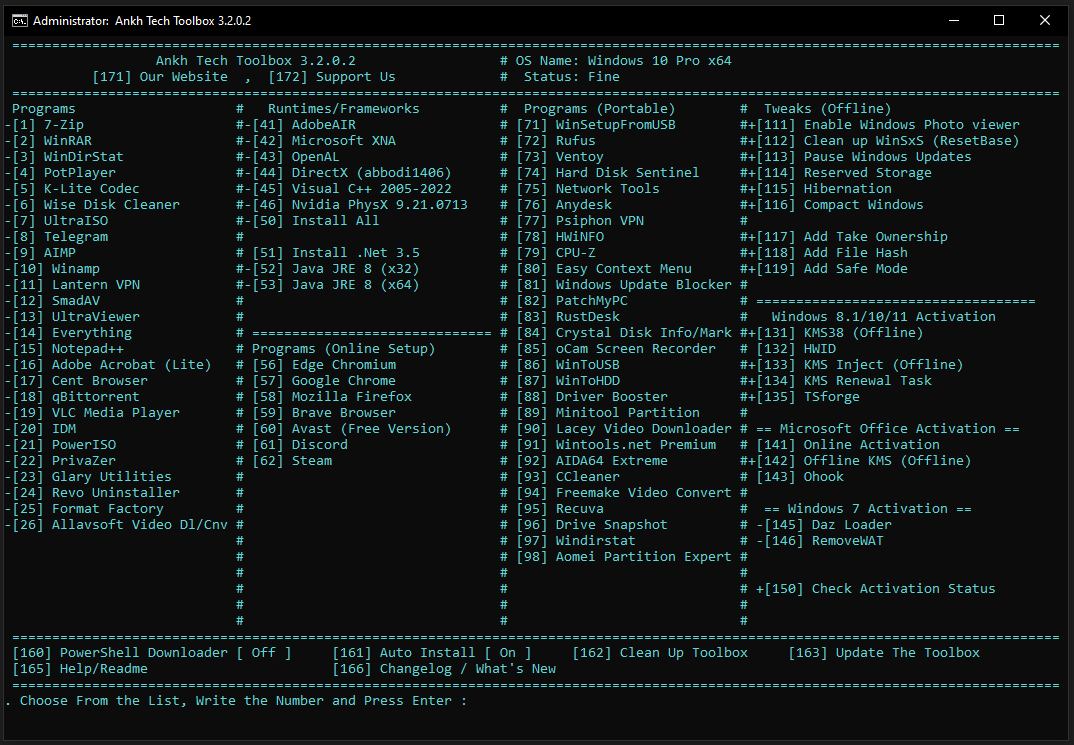
Install Needed Programs in a few clicks
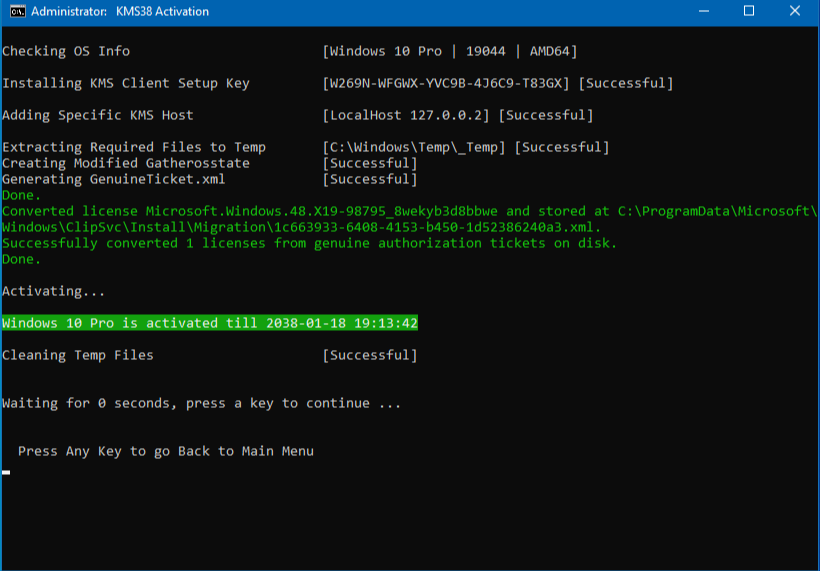
Activate your Microsoft Windows or Microsoft Office
Support x32 and x64
Simple Interface
- With a Simple interface where all you have to do is write the number of option you want and press Enter
- Full Automatic Download and installation
- a simple tool that runs on any Microsoft Windows with no requirements, Works on x32 and x64
- All Programs Installed are Activated
- Programs Section Contains most Used Softwares (Activated and Free)
- Runtimes contains Required softwares for games to run without errors of missing dll files
- Windows Activations for Windows 8.1/10/11 and even Windows 7
- Context Menu: Take Ownership Added, Windows Mode (Dark/Light) Added
- Portable : Programs gets downloaded on desktop with no installation
- The Toolbox is totally safe it doesn't have any Dangerous tweaks that could cause problems
- Please Note : Whatever you Choose , Will be Downloaded and Installed also Kept in the Toolbox files so you can install it again later on the same PC or on Different PC
- Also Note : you can Turn On the PowerShell Downloading , Write the Number 128 and Press Enter to Activate the PowerShell Downloading This Will Solve the Issue " This App Can't Run on This PC "
Fast Activation
- Minimal amount of UWP Apps:
- Activate your Microsoft Windows in a few clicks safely by the safest activation tools offline and online
- Or your Microsoft Office (2010 - 2021)
- Windows (8.1 / 10 / 11) Activation & Office Activation are Based on MAS AIO and KMS Suite
- Windows 7 Activations are Daz Loader and RemoveWAT
- All Rights Reserved to the creators of the Tools/scripts used in the toolbox
- Check our Activators Section for more information about these Tools
Download For Offline Usage
- If you want to just Download the Programs to Install them later , on Your PC or Different PC, just Turn off Auto Install from number 161
- after Turning Off Auto Install , now you just choose to Download Only, The Programs will be Downloaded and will not be Installed
- "+" means the program is downloaded and can be installed Without Internet Connection
- "-" means the Program is not downloaded , and internet connection Required
- if the Option doesn't have "-" or "+" , then this option requires Internet Connection , and can't be Used without Internet Connection (ex: steam , Discord , Avast , HWID Activation)
- Portable Section of course doesn't have Offline , because it's just a program that gets downloaded on your Desktop
- To Delete all the Downloaded Files , Choose Number 162 to clean up the Toolbox Files
- Don't Turn on PowerShell Downloader if you willl Turn off Auto Install (until i fix it)
If you Find Our Modified ISO Helpful, You can Support the Project by Donating
Don't Forget that you can Request Your Own Custom Modified OS
Also Don't Forget that you can Request Your Own Custom Website Design
Download Links x64:
Recommended: send.cm - workupload - Direct
Version: Latest
On First Launch of the Tool it downloads the Latest Update:
You Download Latest Update from the Number 163 , if not Sure just do it !
Important Information
- The First Start of the Toolbox Requires Internet Connection
- Windows 7 Activators gets Detected as a virus
- Some Programs Support only 64bit
Version History
9/18/2025:
Programs updated all programs tested an issue fixed Added Windirstat (Portable) Added AOMEI Partition assistant (Portable)No previous releases available
Your Windows is not Activated? Check the Windows Activators Section
Also Don't forget to Check our AIO Toolbox